> ## Documentation Index
> Fetch the complete documentation index at: https://docs.shipmobilefast.com/llms.txt
> Use this file to discover all available pages before exploring further.
# Fonts
> Customize your app fonts
 You can use the `FONT_SIZE` object to define the size of the fonts.
First, go to the `assets/fonts` folder.
You can use the `FONT_SIZE` object to define the size of the fonts.
First, go to the `assets/fonts` folder.
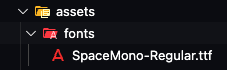 Add your custom fonts there.
Then, go to the `constants/AppConstants.ts` file.
Define your custom fonts there. Like below:
```javascript constants/AppConstants.ts {16} theme={null}
export const FONT_SIZE: Record = {
xxxs: moderateScale(6),
...
};
export const FONT: Record = {
// Implement your custom fonts here:
// It is really easy to use with this way.
sm: 'SpaceMono-Regular',
};
```
Finally, you can use the `FONT_SIZE` and `FONT` objects to style your fonts. Like below:
```javascript components/Text.tsx {3-4} theme={null}
const styles = StyleSheet.create({
text: {
fontFamily: FONT.sm,
fontSize: FONT_SIZE.sm,
},
});
```
Make sure your app/\_layout.tsx file includes the `fontFamily` prop. Like below:
```javascript app/_layout.tsx {2} theme={null}
const [loaded] = useFonts({
SpaceMono-Regular: require('@/assets/fonts/SpaceMono-Regular.ttf'),
// Add more fonts here if needed
});
```
I am using my custom fonts like that and it is really easy to use.
Add your custom fonts there.
Then, go to the `constants/AppConstants.ts` file.
Define your custom fonts there. Like below:
```javascript constants/AppConstants.ts {16} theme={null}
export const FONT_SIZE: Record = {
xxxs: moderateScale(6),
...
};
export const FONT: Record = {
// Implement your custom fonts here:
// It is really easy to use with this way.
sm: 'SpaceMono-Regular',
};
```
Finally, you can use the `FONT_SIZE` and `FONT` objects to style your fonts. Like below:
```javascript components/Text.tsx {3-4} theme={null}
const styles = StyleSheet.create({
text: {
fontFamily: FONT.sm,
fontSize: FONT_SIZE.sm,
},
});
```
Make sure your app/\_layout.tsx file includes the `fontFamily` prop. Like below:
```javascript app/_layout.tsx {2} theme={null}
const [loaded] = useFonts({
SpaceMono-Regular: require('@/assets/fonts/SpaceMono-Regular.ttf'),
// Add more fonts here if needed
});
```
I am using my custom fonts like that and it is really easy to use.